


Operating the Manual Transaxle
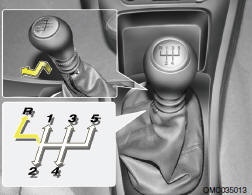
Your Hyundai's manual transaxle has five forward gears and one reverse gear. This shift pattern is also imprinted on the shift knob. The transaxle is fully synchronized in all forward gears so shifting to either a higher or a lower gear is easily accomplished. When shifting into reverse gear, pull the mis-shift prevention tab and shift into reverse gear position.
NOTE:
o To shift into reverse, rest the lever in neutral for at least 3 seconds after your car is completely stopped. Then move the lever into the reverse position. o During cold weather, shifting may be difficult until the transaxle lubricant has warmed up. This is normal and not harmful to the transaxle.
o If you've come to a complete stop and it's hard to shift into 1st or R(Reverse), put the shift lever in N(Neutral) position and release the clutch. Press the clutch pedal back down, and then shift into 1st or R(Reverse) gear position.
o Do not use the shift lever as a handrest during driving, as this can result in premature wear of the transaxle shift forks.
CAUTION:
o Do not downshift more than 2 gears or downshift the gear when the engine is running at high speed (5,000 RPM or higher). Such downshifting may damage the engine.
o When downshifting from fifth gear to fourth gear, caution should be taken not to inadvertently press the gear shift lever sideways in such a manner that second gear is engaged. Such a drastic downshift may cause the engine speed to increase to the point that the tachometer will enter the red zone. Such over revving of the engine may possibly cause engine damage.
See also:
SENSE AND STYLE
Family Friendly (Not Really, Fair, Great, Excellent): Great Fun-Factor (None,
Some, Good Times, Groove-On): None ...
Power Steering Fluid Level
The power steering fluid level should be checked regularly. To check the power
steering fluid level, be sure the engine is "OFF", then check to make certain that
the power steering flu ...
Curtain air bag
Curtain air bags are located along both sides of the roof rails above the front
and rear doors.
They are designed to help protect the heads of the front seat occupants and the
rear outboard s ...