


Turn signals and lane change signals
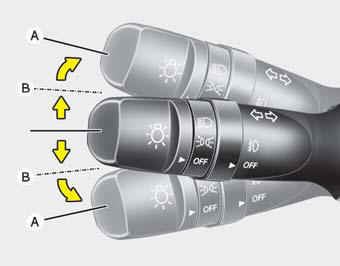
The ignition switch must be on for the turn signals to function. To turn on the turn signals, move the lever up or down (A). Green arrow indicators on the instrument panel indicate which turn signal is operating. They will self-cancel after a turn is completed. If the indicator continues to flash after a turn, manually return the lever to the OFF position.
To signal a lane change, move the turn signal lever slightly and hold it in position (B). The lever will return to the OFF position when released.
If an indicator stays on and does not flash or if it flashes abnormally, one of the turn signal bulbs may be burned out and will require replacement.
One-touch triple turn signal
To activate an one-touch triple turn signal move the turn signal lever up or down slightly and then release it. The lane change signals will blink 3 times.
NOTICE
If an indicator flash is abnormally quick or slow, a bulb may be burned out or have a poor electrical connection in the circuit.
See also:
Accent in the market
If all you need is the most basic transportation, a sub-$10,000 Accent might
be the right pick for you. But once you reach the full price tag by loading it
up with features most buyers expect in a ...
Center Ventilator/Side Ventilator
The center ventilators are located in the middle of the dashboard. The side ventilators
are located on each side of dashboard. To change the direction of the air flow,
move the knob in the cente ...
150,000 miles (240,000 km) or 120 months
❑ Inspect vacuum hose
❑ Inspect air conditioning refrigerant
❑ Inspect brake hoses and lines
❑ Inspect drive shafts and boots
❑ Inspect electronic throttle contr ...